Mobile App

The Property Inspection App That Fits in Your Pocket

Turn any phone or tablet into a professional inspection tool. Check boxes, snap photos, capture signatures, and sync everything to the cloud the moment you are done.

Start Your Free Trial See a Sample Report

No credit card required. 14-day free trial. Free phone support on every plan.

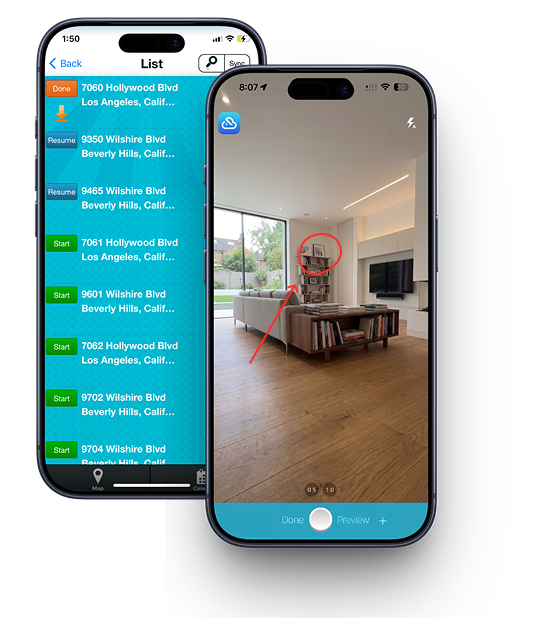
InspectCloud property inspection app on phone and tablet

A property inspection should not require a clipboard, a camera, and an hour back at the office. With the InspectCloud app, your phone is the whole toolkit, and the report is finished before you leave the driveway.

Here is what the app does and why property managers run their whole inspection process from it.

Built for the field

Fast, simple, and designed for real inspectors on real properties.

Works on your own phone

Native iOS and Android apps. Inspectors use their personal devices, you control access from the master account.

Checkbox, comment, photo

A simple system that documents any area and auto-resizes everything into a clean, readable report.

Signatures on the spot

Capture inspector and tenant signatures on the screen to limit liability and settle disputes later.

Syncs to the cloud

Lose your phone and lose nothing. Everything syncs instantly and is available on any device.

Map and calendar modes

Plan your route between properties and see your scheduled inspections at a glance.

Video clip inspections

Add video and voice notes to a report when a photo does not tell the whole story.

What is a property inspection app?

A property inspection app is a mobile app that replaces the clipboard. You walk the unit, check boxes, type or drop in comments, take photos, and collect signatures on the screen. When you're done, the app builds a branded PDF report and emails it out, so there's no typing anything up back at the office.

InspectCloud has been doing this since 2013, and it was built by property managers who were tired of the paper version. The app runs on iPhone, iPad, and Android, and every plan includes it.

What an inspection actually looks like

The app uses a binary decision system, which is a fancy way of saying you're mostly just tapping. Here's the whole flow:

  1. Open the property. Your assigned inspections are waiting in your daily to-do list.
  2. Rename the areas. Every property is laid out differently, so you can rename areas to match the unit you're standing in instead of forcing it into a generic template.
  3. Check, comment, photograph. Tap the condition, add a comment, snap the photo. Comments you use over and over get saved as auto-text, so you drop them in across properties instead of retyping them.
  4. Add video if it helps. Some damage is easier to show than describe. You can attach video clips with voice notes.
  5. Sign it. Inspector and tenant both sign on the screen, which limits your liability later.
  6. Send it. Photos auto-resize into a clean PDF, branded with your logo, and it goes to the owner right away.
The move-in / move-out comparison

This is the part that pays for the software. Comparing a move-in inspection to a move-out inspection by hand takes 20 to 30 minutes per unit, and it's the exact task everyone puts off.

InspectCloud runs a formula against the two inspections and does it in about three seconds. Every difference between them gets highlighted in yellow, and the report builds a side-by-side photo comparison of each area, then and now.

When a tenant disputes a deposit deduction, you're not arguing from memory. You're sending a dated, signed document with two photos of the same wall.

There's also Resident Inspection, a companion app that lets tenants complete their own move-in inspection on their phone. No paper form to lose, and the tenant's own record is the one you compare against later. It's included with PROMAS and Rent Manager plans.

Property management inspection app: running a team

A solo inspector and a property manager with six people in the field need different things. If you're managing a team, the app is only half of it; the web dashboard is where you actually run the operation.

Paper vs the app

Task On paper In the app
Writing up the reportTyped up later at the officeDone when you leave the unit
PhotosShot separately, matched up by handAttached to the area they belong to
Move-in vs move-out20 to 30 minutes per unitAbout three seconds
Tenant signatureA form that gets lostSigned on screen, stored with the report
Owner gets the reportWhenever someone gets to itEmailed on completion
Tracking your teamPhone callsLive dashboard plus a weekly report

Getting your properties in

Nobody wants to type in 400 units one at a time. You can bulk import a whole portfolio from a CSV, whether that's ten properties or well over a thousand.

InspectCloud also connects to PROMAS, Rent Manager, and AppFolio, so your property data can come across from the system you already run.

Templates work the same way. You build your inspection checklist once in the web settings, and it's on every inspector's phone a few minutes later. You can also duplicate an existing inspection and back-date or forward-date it when you need a record that matches what actually happened.

Keep exploring

Property inspection app questions

Yes. InspectCloud has a native app for both iOS and Android, plus a web dashboard. Inspectors work from their own phones or tablets, and everything syncs to the cloud.

Employees can use their personal smartphones. You control each inspector's login and access from the master account, so there is no expensive equipment to buy.

Completed inspections sync to the cloud immediately, so nothing important lives on the device. Log into any other phone, tablet, or computer and your data is all there.

Yes. The app documents each area with checkboxes, comments, and photos, and captures both inspector and tenant signatures right on the screen when the inspection is done.

The app is included with every InspectCloud plan, starting at $49 a month with no setup fees or contract. Try it free for 14 days.

Yes, and it's the fastest thing in the product. InspectCloud compares the two inspections automatically, highlights every difference in yellow, and builds a side-by-side photo comparison of each area. By hand this takes 20 to 30 minutes per unit. Here it takes about three seconds.

Yes. The master inspector view assigns inspections to sub-inspectors and tracks their progress live from the web. Each inspector sees their own daily to-do list in the app, and you get a weekly productivity report showing who inspected what, on what day, and how long they spent at each property.

Yes. You can bulk import a portfolio from a CSV, anywhere from ten properties to well over a thousand. InspectCloud also connects with PROMAS, Rent Manager, and AppFolio.

Yes. You build the checklist once in the web settings and it reaches every inspector's phone within minutes. You can rename areas on the fly too, so a template adapts to whatever unit you're standing in.

Run your next inspection from your phone

Download the app and start a free 14-day trial. Build a template, inspect a property, and email the report before you leave.

Start Free Trial See Pricing